

How do I get Sandbox keys?
How do I get Sandbox keys?
Contact sales@engagexpay.com to get sandbox keys.
What documents are required to onboard business customers?
What documents are required to onboard business customers?
Check our entity-wise document requirements.
What documents are required to onboard individual customers?
What documents are required to onboard individual customers?
Check our individual customer document requirements.
Does engagexpay.com issue fiat virtual accounts?
Does engagexpay.com issue fiat virtual accounts?
Virtual accounts are available in the following currencies and payment rails, subject to the risk classification of the customer’s country of residence:
- USD (ACH & FedWire) - Individuals & Businesses
- USD (SWIFT) - Individuals & Businesses
- MXN (SPEI) - Individuals & Businesses
Why am I getting 'unsupported beneficiary currency and scheme combination' when initiating a USD payout?
Why am I getting 'unsupported beneficiary currency and scheme combination' when initiating a USD payout?
While the beneficiary was created successfully, you should have also received a 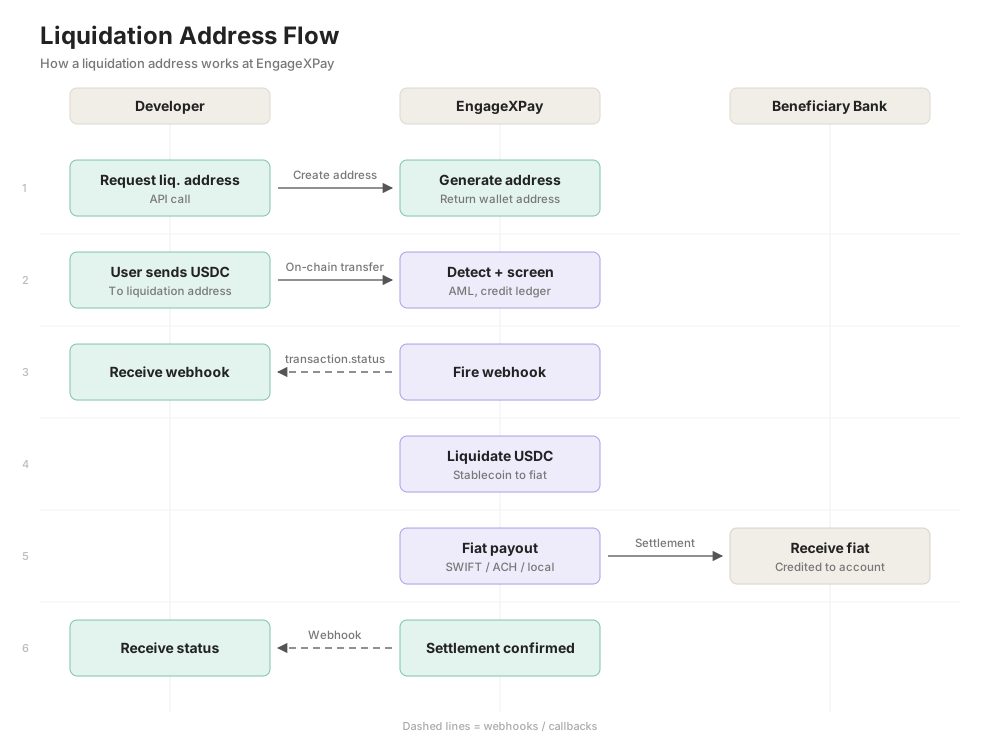
liquidation_address in the response.For USD payouts, the Transfer API and Batch API are not applicable for local routes. If the beneficiary has auto_settlement: false with country USA and currency USD, using those APIs will result in this error. The Transfer/Batch APIs can only be used for USD SWIFT in specific cases where EngageXPay maintains an underlying prefunding with the banking partner.All USD local payouts must go through the liquidation_address. You need to send USDC on Polygon (the currently supported currency and rail, with more being added) to the liquidation_address. This automatically triggers a liquidation address drain, which initiates a payout to the end bank account.You will also receive a transaction.status webhook when funds are received by EngageXPay at the liquidation address.